
There is something genuinely electric about a World Cup year. The anticipation builds for months, the group-stage draws spark debates across dinner tables and office hallways, and then — finally — the whistle blows and 90 minutes of the world’s most-watched sport unfolds in real time. But here is the thing: experiencing that electricity depends almost entirely on how prepared your viewing setup actually is.
The 2026 FIFA World Cup is not just another tournament. It is the largest edition in the competition’s history, spanning three countries — the United States, Mexico, and Canada — with 104 matches spread across an expanded 48-team format and multiple time zones. For fans relying on traditional cable, that kind of schedule is a logistical headache. For fans who know how to watch FIFA World Cup on IPTV through the right legal channels, it is an opportunity to catch every single match in stunning clarity from any room in the house, or frankly, from any country in the world.
This guide walks you through everything: the broadcasting landscape, the hardware you need, the software that makes it all work, the VPN configurations that eliminate buffering, and the legal realities you absolutely cannot afford to ignore heading into 2026.
Table of Contents

Understanding the 2026 FIFA World Cup Broadcasting Landscape
Before you can watch FIFA World Cup on IPTV intelligently, you need to understand who holds the official rights — because those rights determine which platforms are legitimate, which streams are stable, and which subscriptions are worth your money.
In the United States, FOX Sports has locked in the English-language broadcast rights with a commitment that is genuinely impressive. The network has promised a record 340 hours of live programming across the tournament, with 70 matches airing on the main FOX network, 34 on FS1, and — most importantly for IPTV viewers — every single one of the 104 matches available in 4K resolution through the FOX One streaming platform. That 4K promise is significant. Two years ago, 4K sports broadcasting was still something of a novelty. By 2026, it is the baseline expectation for anyone serious about their viewing experience.
For Spanish-speaking audiences across North America, Telemundo and Peacock become the essential destinations. Peacock will stream all 104 games live, making it one of the most comprehensive World Cup Live hubs available anywhere. Telemundo itself will broadcast 92 games, with Universo picking up 12 additional matches. When you account for both language options, there is simply no excuse for missing a match — the official coverage is extensive.
Internationally, the picture is similarly strong. Fans in France can access World Cup Live coverage through M6 and M6+, which have confirmed free-to-air broadcasting for 2026. CANAL+ and beIN SPORTS continue their roles as premium sports rights holders across European markets. For club soccer enthusiasts who also follow domestic leagues, integrating your IPTV setup with services like Ligue 1+ can help consolidate your sports viewing into a single, manageable ecosystem — something worth considering if you are already evaluating best iptv providers for your household.
One practical tip that many fans overlook: platforms like Spliiit allow subscribers to legally pool access to multiple premium sports services, which can reduce the per-person cost of securing a proper iptv subscription significantly. If you are sharing a household or coordinating with friends who follow different leagues, it is worth exploring before the tournament begins.
Hardware Optimization: Building a Setup That Actually Handles 4K
Here is where a lot of people get tripped up. They secure a solid iptv subscription, they find the right official channels, and then they sit down for a match only to watch the screen freeze at the worst possible moment — a penalty kick, a last-minute header, a decisive VAR review. Almost every time, the culprit is not the subscription. It is the hardware.
The good news is that building a reliable 4K-capable IPTV setup does not require an enormous investment. It requires the right choices.
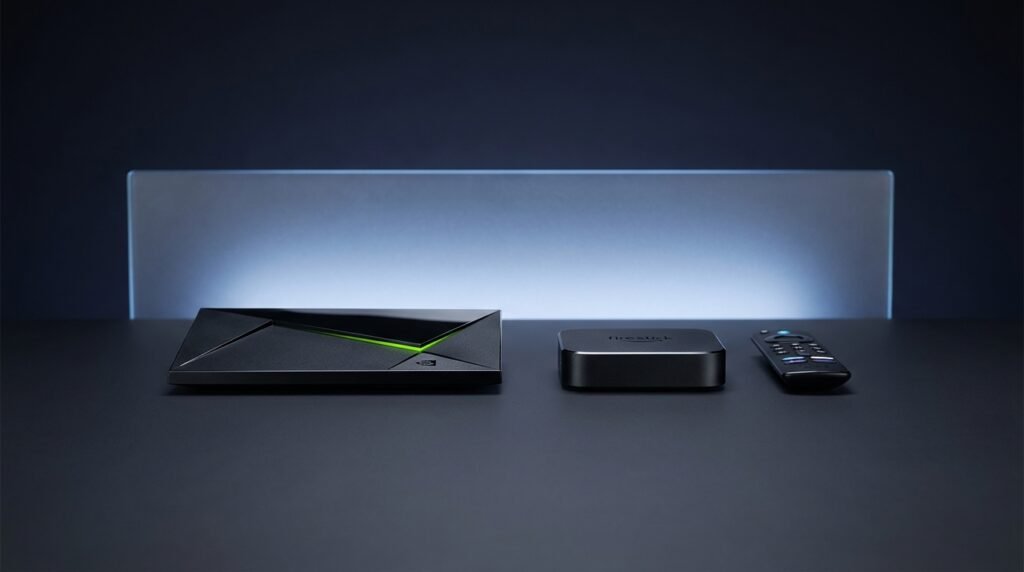
At the top of the hardware hierarchy sits the Nvidia Shield Pro. For anyone serious about iptv for sports at the highest quality tier, the Shield is the standard recommendation for a reason. Its onboard GPU handles H.265 (HEVC) codec decoding natively, which is exactly what high-bitrate 4K World Cup Live streams demand. It runs a full Android TV environment, supports every major IPTV player application, and handles simultaneous processing demands without breaking a sweat. If you are setting up a living room viewing experience for the 2026 IPTV World Cup, this is the device to anchor it around.
For viewers who want strong performance at a friendlier price point, the Amazon Firestick 4K Max (2026 edition) delivers genuinely impressive results — particularly when paired with TiviMate, the application most power users prefer. The Firestick’s limitation is thermal throttling under sustained 4K load, so ventilation matters. Do not tuck it behind a television without airflow.
Dedicated Android TV boxes from brands like Formuler and MAG occupy an interesting middle ground. These devices are engineered specifically for iptv for sports delivery rather than general streaming, which means their firmware is optimized for the kind of sustained, uninterrupted playback that live sports requires. If your household runs multiple streams simultaneously — which is entirely realistic during the group stage when three matches can overlap — a Formuler or MAG box handles concurrent loads more gracefully than a consumer streaming stick.
On the network side, the single most impactful upgrade most people can make is deceptively simple: run a Cat6 Ethernet cable. Wi-Fi introduces variability. Walls, neighboring networks, microwave ovens — all of it creates interference that manifests as buffering during precisely the moments you least want it. A wired connection eliminates that variable entirely.
For bandwidth requirements: HD streaming sits comfortably in the 15–25 Mbps range, but to genuinely enjoy the IPTV World Cup in 4K, you need a dedicated 50 Mbps connection with low latency. Aim for a ping below 30ms. Anything higher and the World Cup Live feed starts drifting out of sync with social media, which — in an age of instant spoiler tweets — is its own kind of frustration.
Software Configuration: TiviMate, IPTV Smarters Pro, and Getting It Right
Think of your IPTV application as the nervous system of your viewing setup. The hardware provides the processing power; the application determines how intelligently that power is used. Getting this configuration right is what separates a seamless experience from a frustrating one.
TiviMate has earned its reputation as the premier IPTV player for Android TV and Firestick environments. Its Electronic Program Guide (EPG) integration is genuinely excellent — for a tournament like the IPTV World Cup where you need to track 104 matches across weeks of competition, having a clean, real-time program guide is not a luxury, it is a necessity. If you are setting this up on a Firestick, our dedicated setup IPTV on Firestick installation guide walks you through the sideloading process step by step, since TiviMate is not available through the official Amazon app store.
When connecting your iptv subscription within TiviMate, use the Xtream Codes API method rather than an M3U playlist URL if your provider supports it. The stability difference is noticeable during high-traffic periods — specifically during major World Cup Live broadcasts when provider servers are under peak demand. M3U playlists can timeout and require manual refreshing; Xtream Codes connections re-authenticate automatically.
Enable Hardware Acceleration in TiviMate’s playback settings. This offloads video decoding to the device’s dedicated hardware decoder rather than running it through software emulation, which reduces CPU usage and eliminates the stuttering that can appear during fast-motion sequences — exactly the kind of sequences that define World Cup football.
IPTV Smarters Pro is the alternative worth knowing, particularly if you want cross-platform flexibility. Available on Android, iOS, and most Smart TV platforms, Smarters supports a feature called Catch Up TV that allows you to rewind a live broadcast by up to several hours. If you miss a goal because you stepped away for two minutes, Catch Up brings you back without requiring a separate VOD service. During the group stage of the IPTV World Cup — when matches in distant time zones overlap with work schedules — this feature alone justifies the configuration effort. For a full walkthrough of the interface and settings, the IPTV Smarters Pro guide covers everything from initial setup through advanced multi-screen configuration.
Speaking of multi-screen: Smarters Pro supports simultaneous streams on a single account, which matters during those overlapping group-stage afternoons. Running two matches side-by-side on a large television while monitoring a third on a tablet is entirely achievable with the right iptv subscription and the right application.

Advanced VPN Configuration: Eliminating Throttling and Geo-Restrictions
ISP throttling is one of the less-discussed but genuinely common reasons that high-quality iptv for sports experiences degrade during major live events. Internet service providers monitor high-bandwidth traffic patterns, and during peak periods — like a World Cup quarterfinal with 200 million global viewers — they sometimes intentionally reduce the throughput allocated to streaming protocols. The result is buffering, quality drops, and the kind of viewing experience that sends people scrolling for alternatives.
A properly configured VPN solves this by encrypting your traffic at the packet level. Your ISP can see that you are sending and receiving data, but cannot determine whether that data is a video stream, a file transfer, or a web browsing session. Without that visibility, throttling policies cannot be selectively applied to your stream.
For the 2026 IPTV World Cup, the protocol choice matters as much as the provider. WireGuard has emerged as the benchmark for live sports VPN use — it offers substantially lower overhead than older protocols like OpenVPN, which translates directly to lower latency and more consistent throughput during 4K streams. When configuring your VPN specifically for World Cup Live viewing, always select UDP transport over TCP. UDP’s connectionless nature prioritizes speed over error correction, which is exactly the right trade-off for a live video stream where a missed packet is less disruptive than a delayed one.
For provider recommendations in 2026: NordVPN leads on raw speed benchmarks and has dedicated servers optimized for streaming traffic. Surfshark offers unlimited simultaneous connections on a single subscription — genuinely useful if you are setting up multiple devices across a household for the tournament. ExpressVPN differentiates itself with a dedicated router-level application, which means you can protect every device on your network through a single configuration rather than installing VPN clients individually.
One additional VPN use case that matters specifically for expats and travelers: geo-restriction bypass. If you are a US-based fan traveling internationally during June or July 2026, your domestic FOX Sports or Peacock access may be blocked based on your connection’s geographic location. A VPN server in the United States restores that access, allowing you to watch FIFA World Cup on IPTV through your legitimate subscription regardless of where you physically are.
The Legal Reality: What 2026’s Anti-Piracy Crackdowns Mean for Viewers
This section matters more than many fans want to acknowledge, but the landscape has shifted significantly enough that it cannot be glossed over.
For years, the enforcement focus in IPTV piracy cases was directed almost entirely at the providers — the services operating illegal rebroadcast infrastructure. Individual users existed in a kind of gray zone where prosecution was technically possible but practically rare. That calculation has changed.
In Spain, a landmark court ruling now compels ISPs to hand over user-identifying information — IP addresses, subscriber names, billing addresses, and contract details — to rights holders pursuing unauthorized streaming cases related to La Liga broadcasts. This is not a hypothetical deterrent. It is an active legal mechanism that has already resulted in enforcement actions against individual viewers.
In the United Kingdom, the regulatory posture is similarly aggressive. Using a modified or “jailbroken” media device to bypass paywalls for premium sports content can now constitute a prosecutable offense under the Fraud Act 2006. Enforcement outcomes range from formal cease-and-desist notices to fines that can reach £50,000 for serious or repeated violations. The Premier League in particular has invested heavily in detection infrastructure — for fans who also follow domestic English football and want to understand the legal framework around legitimate streaming, our guide on how to watch Premier League on IPTV UK covers the verified, legal options in detail.
Beyond the legal exposure, there is a practical security argument for sticking with legitimate sources. Unofficial IPTV streams are a known vector for malware distribution. The ad injection and redirect scripts embedded in pirate stream pages have been linked to ransomware infections, credential theft, and persistent tracking. No match — not even a World Cup final — is worth compromising your device or personal data.
The official World Cup Live feeds available through FOX Sports, Peacock, Telemundo, and their international equivalents offer 4K quality, expert multilingual commentary, redundant infrastructure, and zero legal or security risk. For anyone building a serious iptv for sports setup, these are the foundations worth building on. You can explore the full landscape of legitimate options in our comprehensive iptv for Sports World Cup guide.
Pre-Tournament Checklist: Everything to Verify Before June 11, 2026
The opening match kicks off in Mexico City on June 11, 2026. That date is not as far away as it might feel, and the worst time to discover a configuration problem is 30 minutes before a live broadcast. Work through this checklist in the weeks before the tournament.
Verify your iptv subscription credentials. Confirm that your Xtream Codes API login or M3U URL is active and that your provider has updated their channel list to include all broadcast rights holders for 2026 — FOX Sports, FOX One, Peacock, Telemundo, and their regional equivalents. A provider that has not updated their lineup for 2026 coverage is worth replacing now rather than discovering the gap during the group stage. For a curated list of verified legitimate providers, the iptv subscription directory and the Best IPTV UK guide are reliable starting points for viewers in their respective regions.
Run a speed and latency benchmark. Use a tool like Fast.com or Speedtest.net during peak evening hours — not at 2am when your ISP’s network is underloaded. You need to see at least 50 Mbps sustained throughput and a ping below 30ms for consistent 4K World Cup Live playback. If your numbers fall short, contact your ISP about plan upgrades before the tournament window.
Update all software. Keep TiviMate, IPTV Smarters Pro, and your VPN client on their latest versions. The 2026 broadcast season has introduced updated stream protocols that older application versions may not handle cleanly. This is a five-minute task that eliminates an entire category of potential issues.
Clear your application cache. On Firestick and Android TV devices, accumulated cache data can cause applications to slow down or crash under sustained use. Before any important match window, navigate to your device’s application settings and clear the IPTV player cache. This is especially important if you have been running the application daily since setup.
Test your VPN server selection. Connect to a server geographically close to the broadcaster’s origin point — a US-based server for FOX Sports and Peacock content, for example — and run a test stream during off-peak hours. Note the server that delivers the cleanest result and save it as your default for match days.
Set up your EPG. Ensure your Electronic Program Guide is populated with the full IPTV World Cup schedule, including match times converted to your local time zone. The expanded 48-team format means unusual kickoff windows will be common throughout the group stage.
The Bottom Line
The 2026 FIFA World Cup represents a genuinely historic moment in football — the first 48-team tournament, the first spread across three nations, the first with 104 matches at the highest competitive level the sport has ever staged. The viewing experience you build for it will shape how you remember the tournament.
Done right — legitimate iptv subscription, properly configured hardware, optimized software, clean VPN routing, and a thorough pre-tournament checklist — watching FIFA World Cup on IPTV delivers something cable television simply cannot match: flexibility, picture quality, and the kind of control over your viewing experience that a generation of sports fans has been building toward. The IPTV World Cup is yours to enjoy. Build the setup that lets you actually enjoy it.